Nederlands
Nederlands
Appearance

Gebruik IPFS Ninja rechtstreeks vanuit AI-codeassistenten zoals Claude Code, Cursor en Windsurf. Upload bestanden, pin CID's, beheer mappen en controleer gebruik — allemaal vanuit je AI-gesprek.
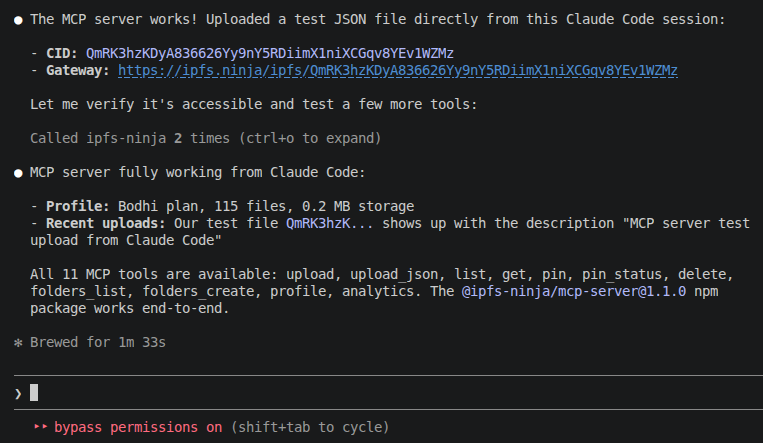
Model Context Protocol (MCP) is een open standaard voor het verbinden van AI-assistenten met externe tools en databronnen. De IPFS Ninja MCP-server biedt 11 tools die AI-modellen kunnen aanroepen tijdens gesprekken om te communiceren met je IPFS Ninja-account.
@ipfs-ninja/mcp-serverBeschikbaar op npm. Geen globale installatie nodig — draait via npx.
Voer dit commando uit in je terminal:
claude mcp add ipfs-ninja \
  --transport stdio \
  -e IPFS_NINJA_API_KEY=bws_your_full_api_key_here \
  -- npx -y @ipfs-ninja/mcp-server
Of voeg handmatig toe aan je .claude/settings.json:
{
  "mcpServers": {
    "ipfs-ninja": {
      "type": "stdio",
      "command": "npx",
      "args": ["-y", "@ipfs-ninja/mcp-server"],
      "env": {
        "IPFS_NINJA_API_KEY": "bws_your_full_api_key_here"
      }
    }
  }
}Sluit Claude Code af en open het opnieuw. Typ /mcp om te controleren of de IPFS Ninja-server is verbonden.
Praat gewoon natuurlijk met Claude:
You: Upload my README.md to IPFS
You: List my recent files
You: How much storage am I using?
You: Pin bafyabc123... from the IPFS network
You: Create a folder called "project-assets"Voeg toe aan je MCP-instellingen (Settings > MCP Servers):
| Instelling | Waarde |
|---|---|
| Name | ipfs-ninja |
| Transport | stdio |
| Command | npx |
| Args | -y @ipfs-ninja/mcp-server |
| Environment | IPFS_NINJA_API_KEY=bws_... |
| Tool | Beschrijving | Voorbeeldprompt |
|---|---|---|
ipfs_upload | Bestandsinhoud uploaden (base64 of tekst) | "Upload this HTML file to IPFS" |
ipfs_upload_json | Een JSON-object uploaden | "Store this config as a permanent JSON on IPFS" |
ipfs_list | Je geuploade bestanden oplijsten | "Show my recent uploads" |
ipfs_get | Bestandsmetadata ophalen op basis van CID | "What type of file is QmXyz...?" |
ipfs_delete | Een bestand unpinnen en verwijderen | "Delete QmXyz... from my account" |
| Tool | Beschrijving | Voorbeeldprompt |
|---|---|---|
ipfs_pin | Een bestaande CID van het netwerk pinnen | "Pin bafyabc... to my account" |
ipfs_pin_status | Pin-voortgang controleren | "Is bafyabc... done pinning?" |
| Tool | Beschrijving | Voorbeeldprompt |
|---|---|---|
ipfs_folders_list | Je mappen oplijsten | "Show my folders" |
ipfs_folders_create | Een nieuwe map aanmaken | "Create a folder called nft-metadata" |
| Tool | Beschrijving | Voorbeeldprompt |
|---|---|---|
ipfs_profile | Plan-, opslag- en bandbreedteinfo ophalen | "How much storage am I using?" |
ipfs_analytics | Dagelijkse bandbreedte- en bestandsstatistieken ophalen | "Show my bandwidth usage this week" |
You: Upload the contents of my dist/ folder to IPFS
Claude: [uploads each file, returns CIDs]

You: What's the CID for index.html?
Claude: [calls ipfs_get]
→ QmXyz... — https://ipfs.ninja/ipfs/QmXyz...You: Create a folder called "my-collection" and upload this metadata JSON
Claude: [calls ipfs_folders_create, then ipfs_upload_json]
→ Folder: my-collection
→ CID: QmAbc... — permanent metadata URL ready for your smart contractYou: Am I close to my storage limit?
Claude: [calls ipfs_profile]
→ Plan: Bodhi, Storage: 45.2 MB / 100 GB (0.04%)
→ You have plenty of room.
You: Show my bandwidth this week
Claude: [calls ipfs_analytics with days=7]
→ 2.3 MB bandwidth, 45 requests across 3 daysYou: Pin the IPFS readme at QmYwAPJzv5CZsnA625s3Xf2nemtYgPpHdWEz79ojWnPbdG
Claude: [calls ipfs_pin]
→ Pin initiated! Status: pinning
You: Is it done?
Claude: [calls ipfs_pin_status]
→ Status: pinned, Size: 0.008 MBDe API-sleutel is niet ingesteld. Zorg ervoor dat de env-sectie in je MCP-configuratie de juiste sleutel bevat.
Je hebt de opslaglimiet van je plan bereikt. Upgrade op ipfs.ninja/pricing of verwijder ongebruikte bestanden.
Je API-sleutel is mogelijk ongeldig of verlopen. Maak een nieuwe aan op Dashboard > API Keys.
/mcp Zorg ervoor dat je Claude Code hebt herstart na het toevoegen van de MCP-server. Controleer of Node.js 18+ is geinstalleerd (node --version).