Bahasa Melayu
Bahasa Melayu
Appearance

Gunakan IPFS Ninja terus dari pembantu pengekodan AI seperti Claude Code, Cursor, dan Windsurf. Muat naik fail, pin CID, urus folder, dan semak penggunaan — semuanya dari perbualan AI anda.
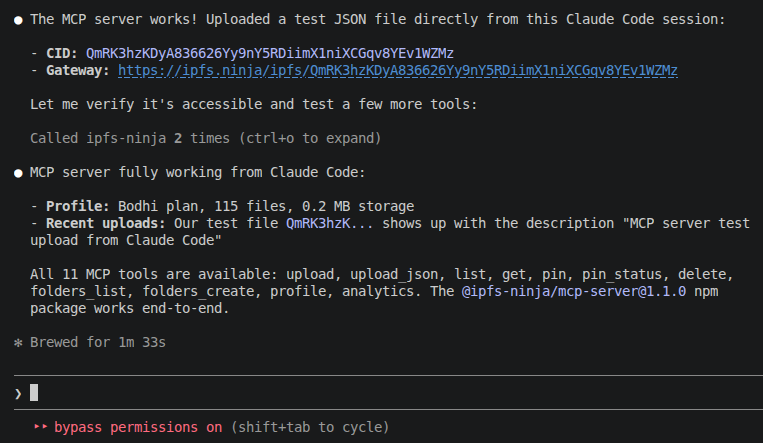
Model Context Protocol (MCP) ialah standard terbuka untuk menghubungkan pembantu AI dengan alat dan sumber data luaran. Pelayan MCP IPFS Ninja menyediakan 11 alat yang boleh dipanggil oleh model AI semasa perbualan untuk berinteraksi dengan akaun IPFS Ninja anda.
@ipfs-ninja/mcp-serverTersedia di npm. Tidak perlu pemasangan global — dijalankan melalui npx.
Jalankan arahan ini di terminal anda:
claude mcp add ipfs-ninja \
  --transport stdio \
  -e IPFS_NINJA_API_KEY=bws_your_full_api_key_here \
  -- npx -y @ipfs-ninja/mcp-server
Atau tambah secara manual ke .claude/settings.json anda:
{
  "mcpServers": {
    "ipfs-ninja": {
      "type": "stdio",
      "command": "npx",
      "args": ["-y", "@ipfs-ninja/mcp-server"],
      "env": {
        "IPFS_NINJA_API_KEY": "bws_your_full_api_key_here"
      }
    }
  }
}Keluar dan buka semula Claude Code. Taip /mcp untuk mengesahkan pelayan IPFS Ninja telah disambungkan.
Bercakap dengan Claude secara semula jadi:
You: Upload my README.md to IPFS
You: List my recent files
You: How much storage am I using?
You: Pin bafyabc123... from the IPFS network
You: Create a folder called "project-assets"Tambah ke tetapan MCP anda (Settings > MCP Servers):
| Tetapan | Nilai |
|---|---|
| Name | ipfs-ninja |
| Transport | stdio |
| Command | npx |
| Args | -y @ipfs-ninja/mcp-server |
| Environment | IPFS_NINJA_API_KEY=bws_... |
| Alat | Penerangan | Contoh arahan |
|---|---|---|
ipfs_upload | Muat naik kandungan fail (base64 atau teks) | "Upload this HTML file to IPFS" |
ipfs_upload_json | Muat naik objek JSON | "Store this config as a permanent JSON on IPFS" |
ipfs_list | Senaraikan fail yang dimuat naik | "Show my recent uploads" |
ipfs_get | Dapatkan metadata fail mengikut CID | "What type of file is QmXyz...?" |
ipfs_delete | Nyahpin dan padam fail | "Delete QmXyz... from my account" |
| Alat | Penerangan | Contoh arahan |
|---|---|---|
ipfs_pin | Pin CID sedia ada dari rangkaian | "Pin bafyabc... to my account" |
ipfs_pin_status | Semak kemajuan pinning | "Is bafyabc... done pinning?" |
| Alat | Penerangan | Contoh arahan |
|---|---|---|
ipfs_folders_list | Senaraikan folder anda | "Show my folders" |
ipfs_folders_create | Cipta folder baru | "Create a folder called nft-metadata" |
| Alat | Penerangan | Contoh arahan |
|---|---|---|
ipfs_profile | Dapatkan maklumat pelan, storan dan jalur lebar | "How much storage am I using?" |
ipfs_analytics | Dapatkan statistik jalur lebar dan fail harian | "Show my bandwidth usage this week" |
You: Upload the contents of my dist/ folder to IPFS
Claude: [uploads each file, returns CIDs]

You: What's the CID for index.html?
Claude: [calls ipfs_get]
→ QmXyz... — https://ipfs.ninja/ipfs/QmXyz...You: Create a folder called "my-collection" and upload this metadata JSON
Claude: [calls ipfs_folders_create, then ipfs_upload_json]
→ Folder: my-collection
→ CID: QmAbc... — permanent metadata URL ready for your smart contractYou: Am I close to my storage limit?
Claude: [calls ipfs_profile]
→ Plan: Bodhi, Storage: 45.2 MB / 100 GB (0.04%)
→ You have plenty of room.
You: Show my bandwidth this week
Claude: [calls ipfs_analytics with days=7]
→ 2.3 MB bandwidth, 45 requests across 3 daysYou: Pin the IPFS readme at QmYwAPJzv5CZsnA625s3Xf2nemtYgPpHdWEz79ojWnPbdG
Claude: [calls ipfs_pin]
→ Pin initiated! Status: pinning
You: Is it done?
Claude: [calls ipfs_pin_status]
→ Status: pinned, Size: 0.008 MBKunci API tidak ditetapkan. Pastikan bahagian env dalam konfigurasi MCP anda mempunyai kunci yang betul.
Anda telah mencapai had storan pelan anda. Naik taraf di ipfs.ninja/pricing atau padam fail yang tidak digunakan.
Kunci API anda mungkin tidak sah atau telah tamat tempoh. Cipta yang baru di Dashboard > API Keys.
/mcp Pastikan anda telah memulakan semula Claude Code selepas menambah pelayan MCP. Semak bahawa Node.js 18+ telah dipasang (node --version).