繁體中文
繁體中文
Appearance

Nirvana 方案使用者可取得位於唯一子網域的私有 IPFS 閘道。此閘道僅提供固定到您帳戶的檔案 — 不會解析其他使用者或公共 IPFS 網路的 CID。
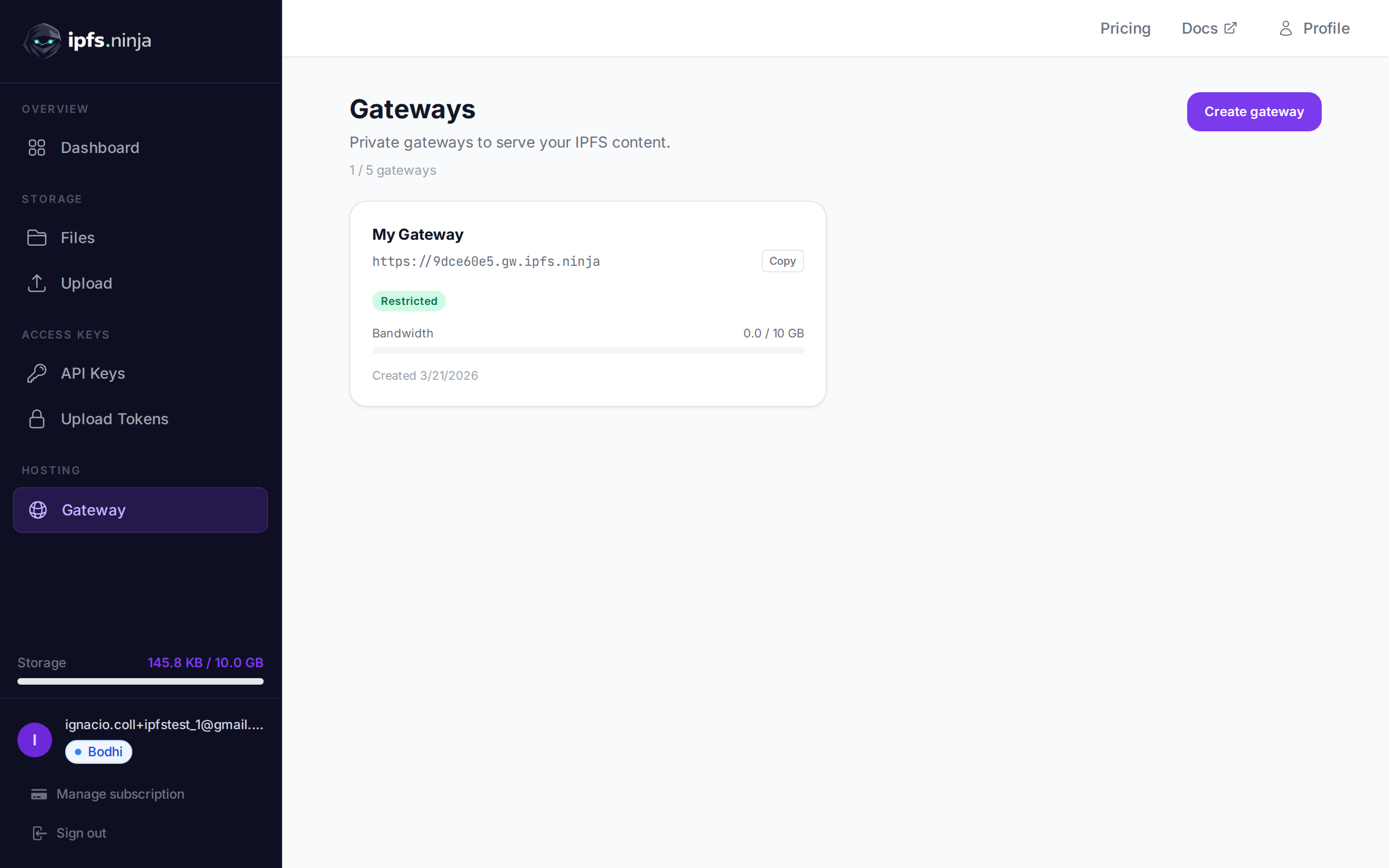
您的閘道 URL 顯示在閘道頁面中,也透過 /user/profile 端點傳回:
https://<your-slug>.gw.ipfs.ninja/ipfs/<CID>| 模式 | 行為 |
|---|---|
| 開放(預設) | 任何擁有您閘道 URL + CID 的人都可以存取您的檔案。無需權杖。 |
| 權杖必填 | 請求必須透過 ?token=gwt_... 查詢參數或 X-Gateway-Token 標頭包含閘道權杖。 |
apex 閘道
https://ipfs.ninja/ipfs/<CID> 的共享 apex 閘道在所有方案中可用,無需身份驗證,但僅提供由 IPFS Ninja 使用者上傳或釘選的 CID。對其他 CID 的請求會傳回 HTTP 410 Gone。
對於您不擁有的 CID,您可以 (a) 執行 POST /pin 將其釘選到您的帳戶,然後使用 apex URL,或 (b) 使用第三方閘道,如 https://ipfs.io/ipfs/<CID> 或 https://dweb.link/ipfs/<CID>。
對於生產級嵌入(影片、NFT 檢視器、網站),上述專用閘道是建議的模式 — 它提供更高的速率限制、可配置的存取控制和專用頻寬。
設定專屬閘道的存取控制。
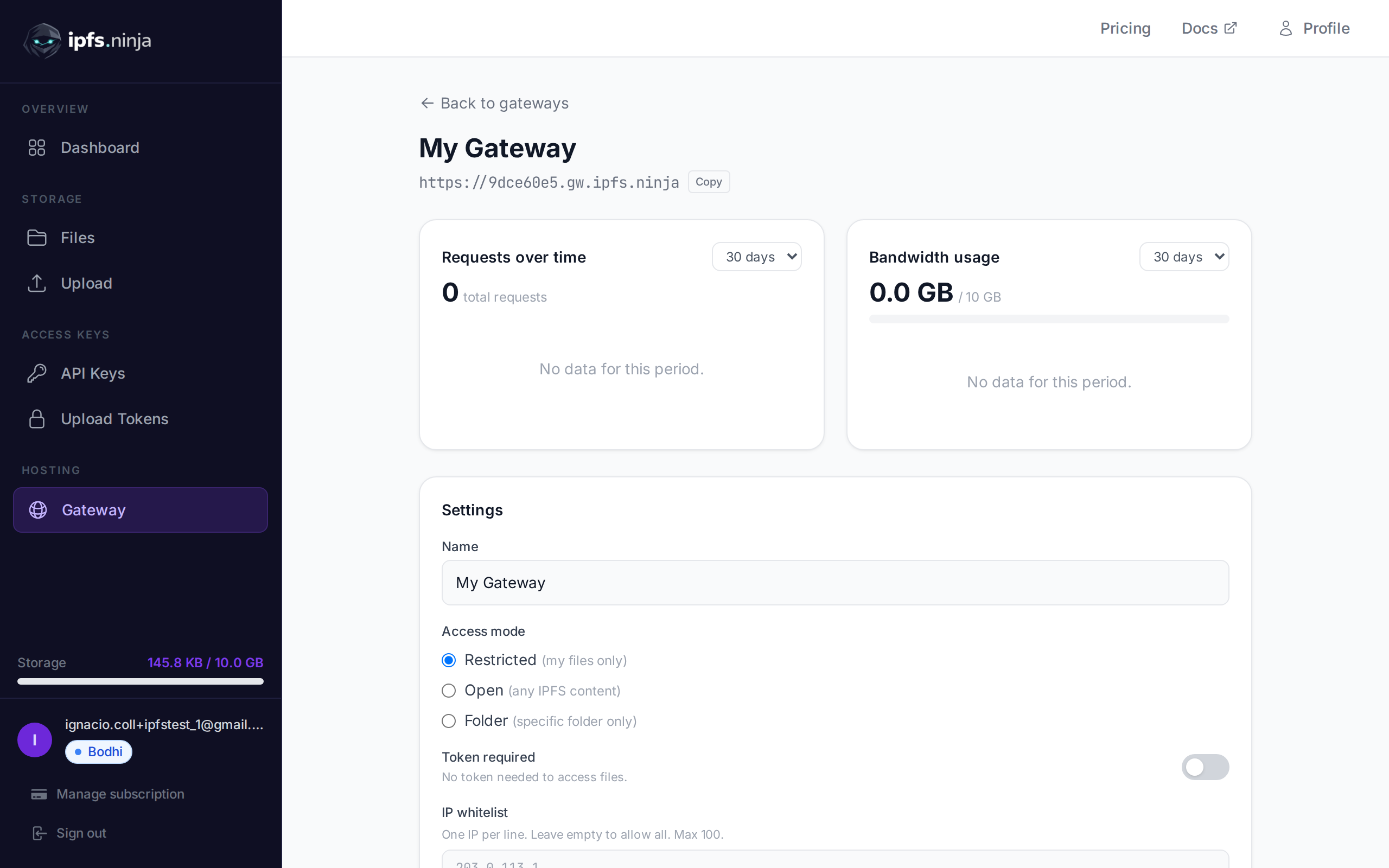
PUT /gateway-settings
| 參數 | 類型 | 必填 | 描述 |
|---|---|---|---|
tokenRequired | boolean | 否 | 啟用/停用閘道權杖要求。 |
ipWhitelist | string[] | 否 | 允許的 IP 位址陣列。最多 100 個。空陣列移除白名單。 |
allowedOrigins | string[] | 否 | 允許瀏覽器請求的來源陣列。最多 100 個。必須使用 HTTPS 格式(如 https://myapp.com)。空陣列允許所有來源。 |
# 啟用權杖必填模式
curl -X PUT https://api.ipfs.ninja/gateway-settings \
  -H "X-Api-Key: bws_your_api_key_here" \
  -H "Content-Type: application/json" \
  -d '{"tokenRequired": true}'

# 設定 IP 白名單
curl -X PUT https://api.ipfs.ninja/gateway-settings \
  -H "X-Api-Key: bws_your_api_key_here" \
  -H "Content-Type: application/json" \
  -d '{"ipWhitelist": ["203.0.113.1", "198.51.100.0"]}'

# 清除 IP 白名單(允許所有 IP)
curl -X PUT https://api.ipfs.ninja/gateway-settings \
  -H "X-Api-Key: bws_your_api_key_here" \
  -H "Content-Type: application/json" \
  -d '{"ipWhitelist": []}'

# 限制為特定來源
curl -X PUT https://api.ipfs.ninja/gateway-settings \
  -H "X-Api-Key: bws_your_api_key_here" \
  -H "Content-Type: application/json" \
  -d '{"allowedOrigins": ["https://myapp.com", "https://staging.myapp.com"]}'

# 移除來源限制(允許所有來源)
curl -X PUT https://api.ipfs.ninja/gateway-settings \
  -H "X-Api-Key: bws_your_api_key_here" \
  -H "Content-Type: application/json" \
-d '{"allowedOrigins": []}'設定 allowedOrigins 後,僅允許來自列出來源的瀏覽器請求。閘道會檢查傳入請求的 Origin 和 Referer 標頭。
Origin 或 Referer 標頭的請求將被 403 回應拒絕。Origin 標頭的非瀏覽器請求(如伺服器端請求或 curl)不受限制通過。這對於在 Web 應用程式中嵌入閘道內容同時防止其他網站盜連您的檔案非常有用。
閘道權杖(gwt_ 前綴)是唯讀的,可安全嵌入前端應用程式。與 API 金鑰不同,閘道權杖只能透過您的專屬閘道存取檔案 — 不能上傳、刪除或管理您的帳戶。
| 功能 | API 金鑰 (bws_) | 閘道權杖 (gwt_) |
|---|---|---|
| 上傳 / 刪除檔案 | 是 | 否 |
| 列出 / 取得檔案中繼資料 | 是 | 否 |
| 透過閘道讀取檔案 | 否 | 是 |
| 可安全嵌入前端 | 否 | 是 |
POST /gateway-tokens
| 參數 | 類型 | 必填 | 描述 |
|---|---|---|---|
name | string | 否 | 權杖標籤(如 "Frontend")。預設為 "Default"。 |
201 Created {
"token": "gwt_a1b2c3d4e5f6789012345678abcdef01",
"tokenPrefix": "gwt_a1b2c3d4",
"tokenName": "Frontend",
"createdAt": 1711036800000
}WARNING
完整權杖僅在建立時傳回一次。請妥善保管。
GET /gateway-tokens
[
  {
    "tokenPrefix": "gwt_a1b2c3d4",
    "tokenName": "Frontend",
    "createdAt": 1711036800000
  }
]DELETE /gateway-tokens/:prefix
| 參數 | 類型 | 必填 | 描述 |
|---|---|---|---|
prefix | string | 是 | 要刪除的權杖前綴(如 "gwt_a1b2c3d4")。 |
當您的閘道啟用了權杖必填模式時,將權杖作為查詢參數或標頭傳遞:
# 查詢參數
curl "https://a1b2c3d4.gw.ipfs.ninja/ipfs/QmXk7VRz...?token=gwt_your_token"

# 或標頭
curl https://a1b2c3d4.gw.ipfs.ninja/ipfs/QmXk7VRz... \
  -H "X-Gateway-Token: gwt_your_token"