Pinata vs IPFS Ninja 2026: Pricing, Gateways & API Compared
Pinata vs IPFS Ninja in 2026: pricing ($20/mo vs $5/mo), free-tier limits, dedicated-gateway performance, IPNS support, and REST API design side by side.
 by Nacho Coll
Nacho founded IPFS.NINJA to make content-addressed storage feel as simple as an S3 PUT — a single API call, a permanent CID, no wallets or peer discovery to reason about.
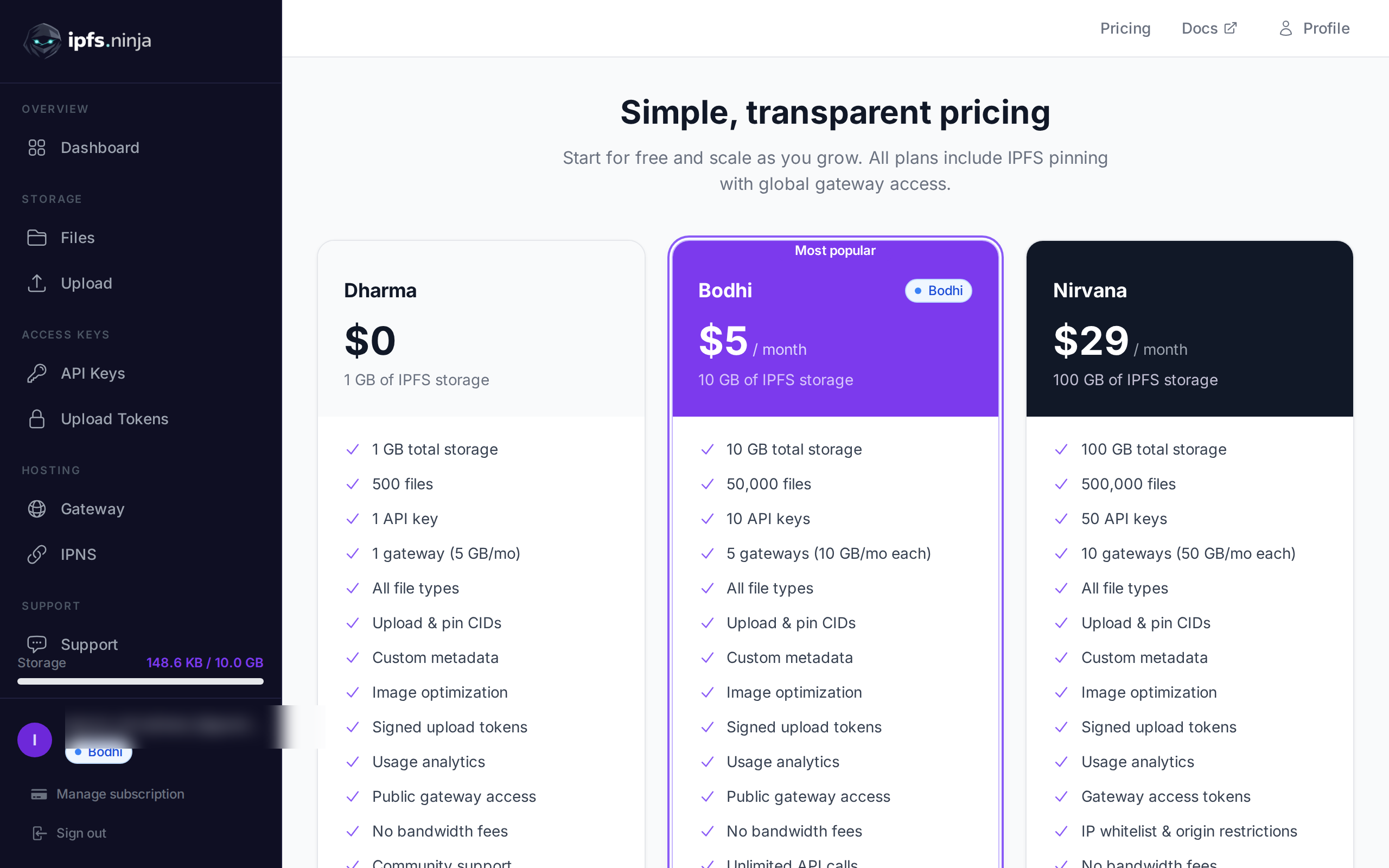
- IPFS Ninja offers a 7-day trial with 10 GB / 200 files / 1 dedicated gateway (trial file cap; Bodhi $5/mo lifts to unlimited) — no card. Pinata offers a permanent free tier (500 files, 1 GB) but no dedicated gateway on it.
- Bodhi ($5/mo) undercuts Pinata's cheapest paid plan, Picnic ($20/mo), by a wide margin.
- IPFS Ninja bundles IPNS mutable names into every paid tier; Pinata does not offer IPNS at all.
- Karma ($19/mo) matches or beats Picnic's storage while staying under Pinata's $20/mo entry price.
Pinata and IPFS.NINJA are both established IPFS pinning services in 2026, and the choice between them comes down to four practical axes: pricing (Bodhi $5/mo undercuts Picnic $20/mo), feature parity (IPFS.NINJA bundles IPNS; Pinata bundles Private IPFS), dedicated-gateway control (three access modes on IPFS.NINJA), and developer ergonomics (Pinata ships a TypeScript SDK; IPFS.NINJA exposes a language-agnostic REST API).
Last verified: 2026-08-27
This guide puts them side by side so you can pick the one that fits your project, your budget, and your workflow. We’re direct about where each service excels and where it falls short.
Before choosing a pinning service, review our IPFS vs S3 comparison to confirm IPFS is the right storage layer for your use case.
Quick Comparison Table#
| Feature | IPFS Ninja | Pinata |
|---|---|---|
| Try before you pay | 7-day trial (10 GB, 200 files, 20 GB bw, dedicated gateway) · no card · paid Bodhi lifts file cap to unlimited | Permanent free tier · 500 files, 1 GB · no dedicated gateway |
| Lowest paid plan | $5/mo (Bodhi) | $20/mo (Picnic) |
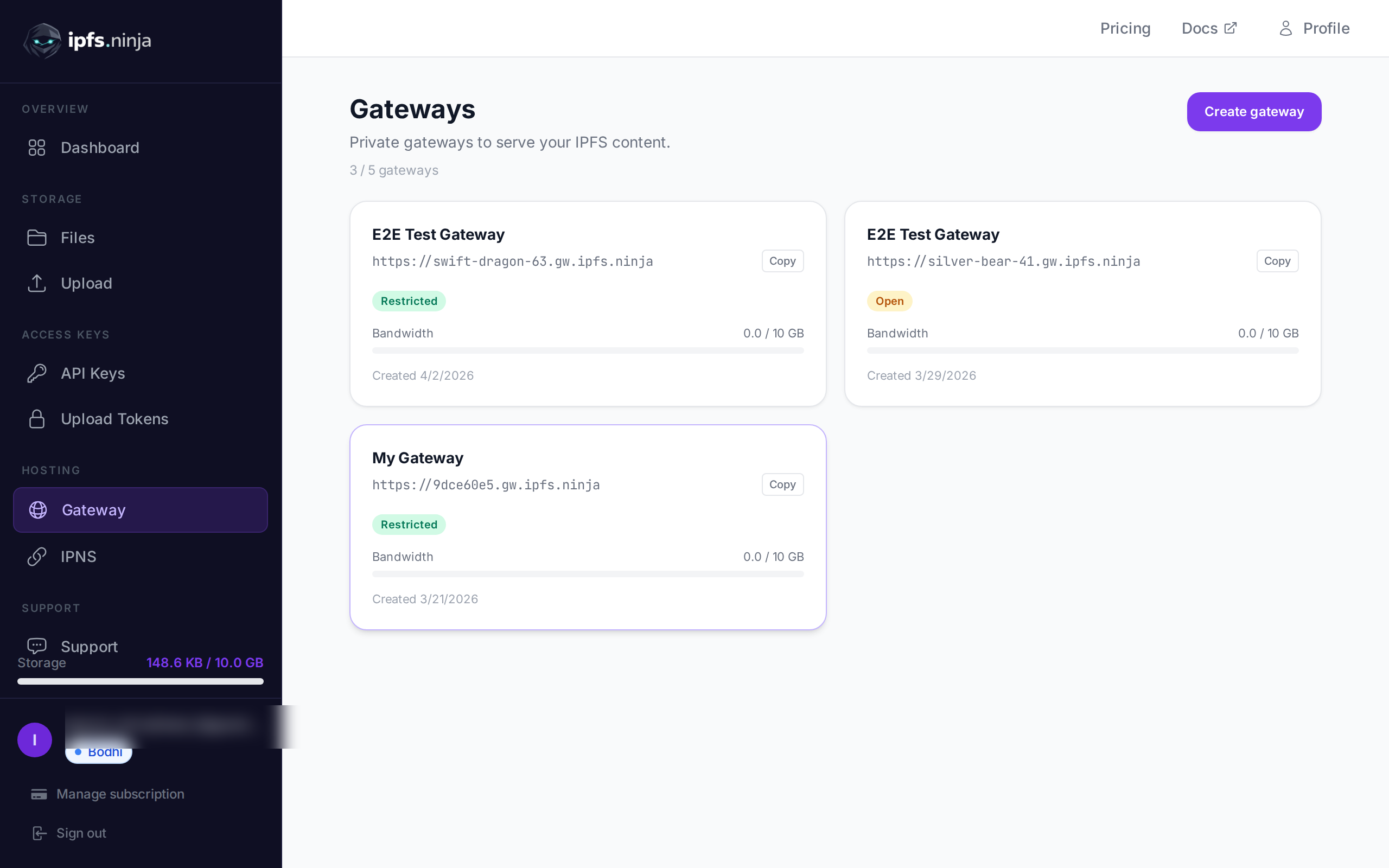
| Mid-tier plan | $19/mo (Karma) | $100/mo (Fiesta) |
| Top tier plan | $59/mo (Nirvana) | Enterprise (custom) |
| Storage (paid entry) | 10 GB | Varies by plan |
| API keys (paid entry) | 3 | Limited |
| Dedicated gateways | Yes (all paid plans) | Yes |
| Gateway access modes | Restricted, Open, Folder | Token-gated, IP/origin restrictions |
| Upload tokens | Yes (signed, time-limited) | Signed upload URLs (paid plans) |
| Image optimization | Via API endpoint | Via gateway transforms |
| SDKs | REST API (any language) | JS/TS (pinata-web3) |
| Private content access | Yes — restricted gateways + token auth | Yes — Private IPFS |
| File grouping | Folders | File Groups |
| Analytics | Per-file, per-key, daily charts | Traffic by CID (paid plans) |
| IPNS mutable names | 1–10 names per plan | Not available |
| Broader file storage | IPFS-focused | Files API (IPFS + general) |
Pricing#
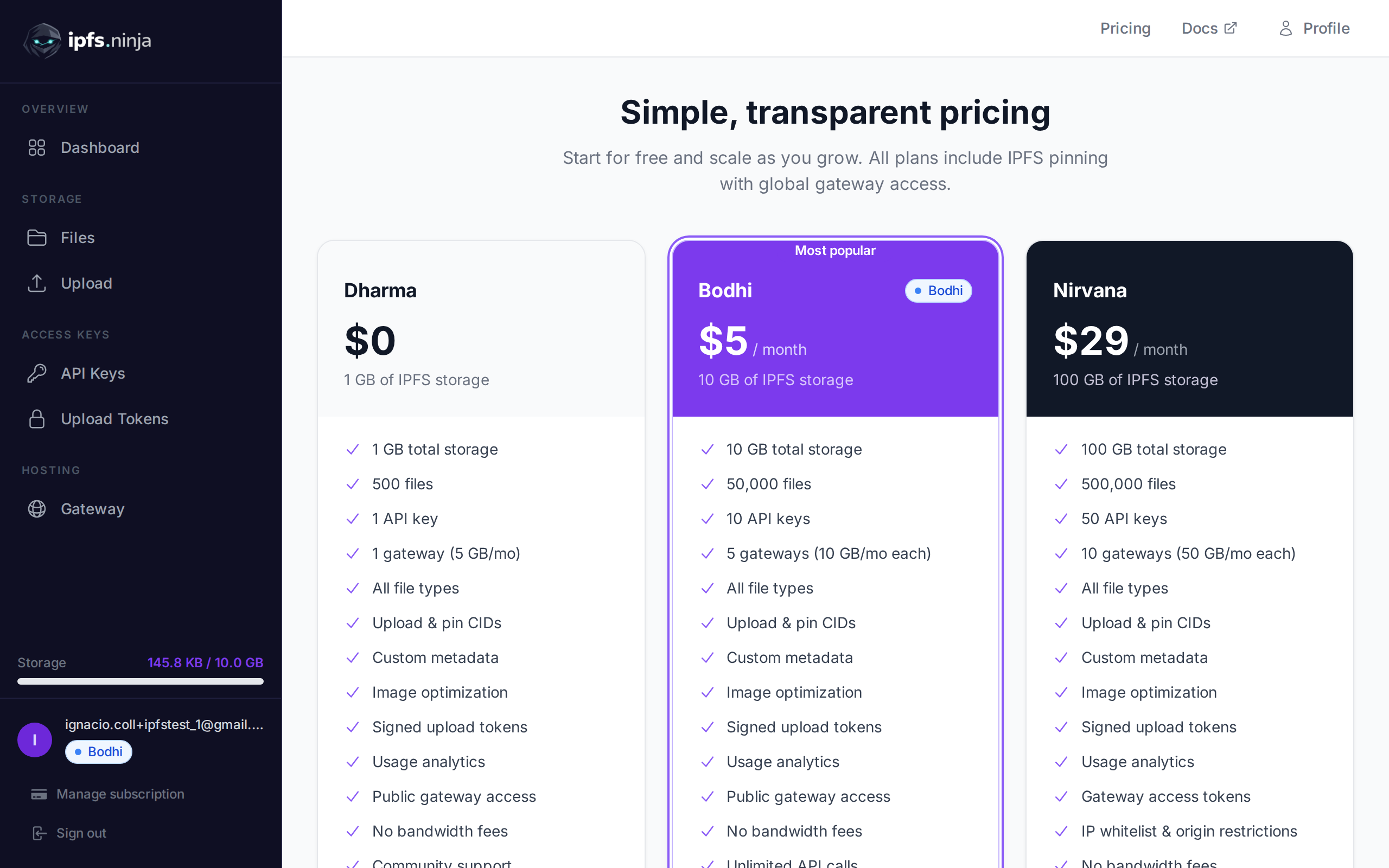
The IPFS.NINJA vs Pinata pricing gap in 2026 is roughly 4x at the entry paid tier: Bodhi ($5/mo) covers 10 GB, unlimited files, 20 GB bandwidth, and one dedicated gateway, while Pinata’s lowest paid tier, Picnic, starts at $20/mo. IPFS.NINJA’s 7-day trial gives 10 GB / 200 files / 20 GB bandwidth / 1 dedicated gateway with no credit card (paid Bodhi lifts the file cap to unlimited); Pinata’s permanent free tier caps at 500 files and 1 GB.
IPFS Ninja#
IPFS Ninja offers three paid tiers and a 7-day trial that gives you the full paid experience, not a stripped-down free preview:
- 7-day trial ($0, no credit card) — Full Bodhi capacity: unlimited files, 10 GB storage, 20 GB monthly bandwidth, 3 API keys, 1 dedicated gateway, 1 IPNS key. The idea is to let you exercise the exact features you’d get on the paid plan you’re evaluating — dedicated gateway with access controls, IPNS, signed upload tokens, analytics, S3-compatible API, MCP server — before committing. On day 8, pick a paid plan below. If you don’t upgrade, your account transitions to a read-only state for 30 days — pinned CIDs continue serving through the gateway during that window and you can re-subscribe at any time.
- Bodhi ($5/mo) — Unlimited files, 10 GB storage, 20 GB monthly bandwidth, 3 API keys, dedicated gateway. The cheapest paid tier for hobby projects and proofs of concept (file cap removed 2026-08-26).
- Karma ($19/mo) — Unlimited files, 100 GB storage, 100 GB monthly bandwidth, 10 API keys, dedicated gateway, IPNS. The sweet spot for small-to-medium projects.
- Nirvana ($59/mo) — Unlimited files, 1 TB storage, 500 GB monthly bandwidth, 50 API keys, dedicated gateway, priority support. Designed for production workloads and teams.
Pinata#
Pinata’s pricing has evolved over the years:
- Free — 500 files, 1 GB storage. A permanent free tier that reasonable for indefinite low-volume hobby projects, but excludes dedicated-gateway features that IPFS Ninja lets you exercise during its trial.
- Picnic ($20/mo) — Expanded storage and features. The jump from free to $20 is steep if you only need a modest increase in capacity.
- Fiesta ($100/mo) — Higher storage and features for growing projects.
- Enterprise — Custom pricing for private file features and higher volume.
The $5 vs $20 gap#
For developers who have exercised the 7-day trial and want to keep going, IPFS Ninja’s paid plans cover a wide range. The $5/mo Bodhi tier is the cheapest entry point on the market. For projects that need more capacity, Karma at $19/mo gives you unlimited files, 100 GB storage, and 100 GB bandwidth — still under Pinata’s $20 entry-level paid price, with IPNS and multiple API keys included. If your project is a side hustle, an NFT collection, or an early-stage dApp, that price gap adds up over time. Pinata, on the other hand, bundles more general-purpose file storage features into its paid tiers, which may justify the price if you plan to use those capabilities.
API and Developer Experience#
On developer experience, Pinata ships an official TypeScript/JavaScript SDK (pinata-web3) that handles auth, retries, and multipart uploads for JS/TS projects. IPFS.NINJA exposes a language-agnostic REST API at api.ipfs.ninja plus a first-class upload-token pattern for client-side uploads that never expose your master API key. Neither ships an official Python SDK — community wrappers exist for both.
IPFS Ninja#
IPFS Ninja exposes a clean REST API at https://api.ipfs.ninja. The primary upload endpoint is POST /upload/new, which accepts any file type along with optional metadata and descriptions.
Authentication uses three mechanisms:
- API keys — Passed via the
X-Api-Keyheader. Straightforward and suitable for server-to-server calls. - Upload tokens — Signed, time-limited tokens that are safe to use on the client side. This is a practical design choice: you generate a token on your backend, hand it to the browser or mobile app, and the client uploads directly to IPFS Ninja without exposing your API key.
- Bearer JWT — Used for dashboard and browser sessions. The JWT is passed in the
Authorizationheader and authenticated by our auth service.
The upload-token pattern solves a real problem. Many developers building browser-based dApps need a way to let users upload files without proxying everything through their own server. IPFS Ninja’s approach is clean and avoids the security pitfalls of embedding API keys in client code.
There are no official SDKs — the API is REST-based and works with any HTTP client in any language. Whether that is a pro or a con depends on your preference. Some developers prefer a thin, well-documented REST API over a framework-specific SDK that may lag behind the service itself. Try it yourself with our upload guide, which covers curl, JavaScript, and Python examples end to end.
Pinata#
Pinata offers an official TypeScript/JavaScript SDK (pinata-web3), which lowers the barrier to entry for developers working in that ecosystem. If you are building a Node.js or TypeScript project, the SDK handles authentication, retries, and multipart uploads for you. Note that Pinata does not offer an official Python SDK — only community-maintained packages exist.
Pinata’s API has matured considerably and now extends beyond pure IPFS pinning into a broader “Files API” that supports general-purpose file storage. This gives Pinata flexibility — you can use it for IPFS content and for files that never touch IPFS at all. Through 2026 their public roadmap and blog cadence have visibly leaned toward AI-agent tooling; pure IPFS pinning remains fully supported, but it’s no longer the fastest-moving surface of the product.
Authentication is key-based, and Pinata provides JWT-based options as well.
Verdict on DX#
If you want an official SDK and are working in JS/TS, Pinata has an edge. If you prefer a language-agnostic REST API with a strong client-side upload story (upload tokens), IPFS Ninja is compelling.
Gateway Features#
Both services ship dedicated gateways on paid plans in 2026, but the control surface differs. Pinata’s gateways are battle-tested at scale, support token-gating, and expose image transforms via URL parameters. IPFS.NINJA bundles a dedicated gateway with every paid plan (and the 7-day trial), plus three access modes — Restricted, Open, Folder — with IP whitelisting and origin restrictions.
IPFS Ninja#
IPFS Ninja provides dedicated gateways on all paid plans (Bodhi, Karma, and Nirvana). What sets them apart is the access mode system:
- Restricted — Only CIDs owned by the user can be served through the gateway (CID ownership check). This prevents the gateway from being used to fetch arbitrary IPFS content. Note that token requirement is a separate, independent setting (
tokenRequired) that can be enabled on any access mode. - Open — Anyone can access the content. Standard public gateway behavior.
- Folder — Scoped to a specific folder of pinned content. Handy for NFT collections or static sites where you want to expose a subset of your files.
On top of access modes, gateways support IP whitelisting and origin restrictions, which give you fine-grained control over who can fetch your content. For projects that need to serve IPFS content only to their own frontend or a known set of clients, this is valuable.
IPFS Ninja also provides image optimization via a separate API endpoint (GET /image/{cid}), which serves resized or reformatted images without requiring you to process them before upload. This is handled through the API, not inline at the dedicated gateway.
Pinata#
Pinata’s dedicated gateways are well-regarded and performant. They support token-gating for access control and offer image transformations via gateway parameters. Pinata has invested heavily in gateway speed and reliability, and it shows — their gateways are fast and widely used in production NFT projects.
Verdict on gateways#
Pinata’s gateways are battle-tested at scale and have a strong reputation. IPFS Ninja offers more granular access control (three distinct modes, IP whitelisting, origin restrictions) and includes a dedicated gateway on every paid plan and during the 7-day trial. If access control flexibility matters to your project, IPFS Ninja has the edge. If raw gateway performance at scale is your top priority and you are willing to pay for it, Pinata is a safe bet.
Dashboard and UI#
IPFS Ninja#
The IPFS Ninja dashboard is organized around the core tasks a developer needs:
- Upload — Drag-and-drop or API-driven uploads with metadata and descriptions.
- Files — Three different views for browsing uploaded content, accommodating different workflows.
- Folders — Logical grouping of files, useful for organizing NFT collections or project assets.
- API keys — Create and manage multiple keys, each with its own scope.
- Upload tokens — Generate and track time-limited client-safe tokens.
- Gateways — Configure dedicated gateways with access modes and restrictions.
- Analytics — Per-file and per-API-key usage data with daily charts.
The analytics deserve a mention. Being able to see which files are being requested, broken down by API key and over time, is useful for debugging, monitoring, and understanding how your content is consumed.
Pinata#
Pinata’s dashboard is clean and mature. It provides file management, File Groups for organization, and gateway configuration. Pinata has iterated on its UI for years, and the experience is polished. The Private IPFS feature for private files is integrated directly into the dashboard, making it easy to toggle file visibility.
Verdict on UI#
Both dashboards are functional and well-designed. IPFS Ninja’s analytics and multi-view file browsing offer more operational insight. Pinata’s UI benefits from years of refinement and a large user base providing feedback.
Unique Features#
What IPFS Ninja offers that Pinata does not#
- Upload tokens — Signed, time-limited tokens designed for client-side uploads. This is a first-class feature, not a workaround.
- Three gateway access modes — Restricted, Open, and Folder modes give you precise control over content visibility.
- IP whitelisting and origin restrictions — Network-level access control on gateways.
- Per-file and per-key analytics with daily charts — Granular usage visibility out of the box.
- IPNS mutable names — Create stable, human-friendly names that point to changing CIDs. 1 name on Bodhi, 3 on Karma, 10 on Nirvana. Pinata does not offer IPNS.
- $5/mo Bodhi tier — A meaningful paid plan that sits below Pinata’s $20 entry point.
What Pinata offers that IPFS Ninja does not#
- Official SDK — The TypeScript/JavaScript SDK reduces boilerplate and handles edge cases.
- Private IPFS — Private file storage with toggleable visibility, a mature feature for gated content.
- Files API beyond IPFS — Pinata has expanded into general-purpose file storage, which is useful if your project needs both IPFS and traditional file hosting.
- File Groups — A flexible organizational primitive that works well for large collections.
- Established scale — Pinata has been in the market longer and handles very large volumes. If you are running a project with millions of pins, Pinata’s track record at scale is reassuring.
When to Choose IPFS Ninja#
IPFS Ninja is the stronger choice when:
- You need a budget-friendly paid tier. The Bodhi plan at $5/mo (or Karma at $19/mo for 100 GB) gives you a graduated path after the 7-day trial — ideal for projects that need real dedicated-gateway features but are not ready to spend $20+/mo.
- Your app uploads from the client side. Upload tokens are purpose-built for browser and mobile uploads without exposing API keys.
- You need granular gateway access control. Restricted, Open, and Folder modes plus IP whitelisting and origin restrictions cover a wide range of access patterns.
- You want detailed analytics. Per-file and per-key daily charts help you understand usage without setting up external monitoring.
- You prefer a language-agnostic REST API. No SDK lock-in; use any HTTP client in any language.
When to Choose Pinata#
Pinata is the stronger choice when:
- You want official SDK support. If you are building in JavaScript or TypeScript and want a batteries-included library, Pinata’s SDK saves time.
- You need private file toggling. Private IPFS is a mature, well-documented solution for gating access to content.
- You need general-purpose file storage alongside IPFS. Pinata’s Files API supports non-IPFS storage, which simplifies your stack if you need both.
- You are operating at very large scale. Pinata has handled massive volumes for major NFT launches and has a long track record of reliability under load.
- You prefer a larger community and ecosystem. Pinata’s larger user base means more tutorials, Stack Overflow answers, and community resources.
Verdict#
Both IPFS Ninja and Pinata are solid IPFS pinning services, and picking between them comes down to what your project actually needs.
If you are cost-sensitive, need client-side uploads, or want fine-grained gateway access control, IPFS Ninja delivers more value per dollar. The $5/mo Bodhi plan is genuinely hard to beat for small and medium projects, and features like upload tokens and gateway access modes solve real problems that other services leave to you.
If you want an official SDK, need private file toggling with Private IPFS, or are operating at a scale where Pinata’s long track record matters, Pinata is a proven choice that will not let you down.
Looking beyond Pinata? See our full roundup of 7 IPFS pinning services for a broader comparison including Filebase, Web3.Storage, and more.
The good news is that both services use standard IPFS pinning under the hood. Your content is addressed by CID regardless of which service pinned it. Switching costs are low — and there is nothing stopping you from evaluating both (Pinata’s permanent free tier + IPFS Ninja’s 7-day trial) before committing.
Choose the one that fits your workflow today. You can always revisit the decision as your project grows.
Already decided to make the move? See our step-by-step migration guide for the full runbook on moving your pins from Pinata to IPFS Ninja.
Already on Web3.Storage? Our Web3.Storage to IPFS.NINJA migration guide includes an automated Node.js script to move your pins in bulk.
Ready to start pinning? Start your 7-day trial — 10 GB / 200 files / 20 GB bandwidth / 1 dedicated gateway (trial file cap; Bodhi lifts to unlimited). No credit card required. Then Bodhi $5/mo, Karma $19/mo, or Nirvana $59/mo.
About the author
Nacho Coll
Founder & Engineer at IPFS.NINJA
Nacho founded IPFS.NINJA to make content-addressed storage feel as simple as an S3 PUT — a single API call, a permanent CID, no wallets or peer discovery to reason about. Writes about IPFS internals, decentralized storage patterns, and the pinning-service landscape from the operator side of the wire.